Typecho 自定义友链页面教程
1. 创建归档页面模板
首先,在你的 Typecho 主题目录下创建一个名为 links.php 的文件。
sudo nano links.php打开文件后,将以下代码复制粘贴进去(在终端中使用 Ctrl+Shift+V 粘贴即可):
<?php
/**
 * 友情链接页面模板
 *
 * @package custom
 */
if (!defined('__TYPECHO_ROOT_DIR__')) exit;
?>

<?php $this->need('header.php'); ?>

<div class="col-mb-12 col-8" id="main" role="main">
    <article class="post" itemscope itemtype="http://schema.org/BlogPosting">
        <h1 class="post-title" itemprop="name headline">
            <a itemtype="url" href="<?php $this->permalink() ?>"><?php $this->title() ?></a>
        </h1>
        <div class="post-meta">
            <time datetime="<?php $this->date('c'); ?>" itemprop="datePublished"><?php $this->date(); ?></time>
        </div>
        <div class="post-content" itemprop="articleBody">
            <?php
            $content = $this->content;

            // 提取友链列表
            if (preg_match('/<ul id="flinks">(.*?)<\/ul>/is', $content, $matches)) {
                $linksHtml = $matches[1];
                preg_match_all('/<li>(.*?)<\/li>/is', $linksHtml, $items);

                if (!empty($items[1])) {
                    $links = $items[1];
                    $linkCount = count($links);

                    echo '<div class="links-container">';

                    for ($i = 0; $i <= $linkCount - 4; $i += 4) {
                        $name = trim(strip_tags($links[$i]));
                        $url = trim(strip_tags($links[$i + 1]));
                        $avatar = trim(strip_tags($links[$i + 2]));
                        $desc = trim(strip_tags($links[$i + 3]));

                        $colors = ['#42b983', '#4299e1', '#9f7aea', '#ed8936', '#f56565', '#38b2ac'];
                        $color = $colors[$i / 4 % count($colors)];

                        echo '<div class="link-card" style="border-left: 3px solid ' . $color . ';">';
                        echo '<div class="link-avatar"><img src="' . $avatar . '" alt="' . $name . '" onerror="this.src=\'data:image/svg+xml,%3Csvg xmlns=%22http://www.w3.org/2000/svg%22 viewBox=%220 0 100 100%22%3E%3Crect fill=%22%23ddd%22 width=%22100%22 height=%22100%22/%3E%3Ctext x=%2250%25%22 y=%2250%25%22 dominant-baseline=%22middle%22 text-anchor=%22middle%22 font-size=%2240%22 fill=%22%23999%22%3E' . mb_substr($name, 0, 1) . '%3C/text%3E%3C/svg%3E\'"></div>';
                        echo '<div class="link-info">';
                        echo '<a href="' . $url . '" target="_blank" class="link-name">' . $name . '</a>';
                        echo '<p class="link-desc">' . $desc . '</p>';
                        echo '</div>';
                        echo '</div>';
                    }

                    echo '</div>';

                    // 页面样式
                    echo '<style>
                    .links-container {
                        display: grid;
                        grid-template-columns: repeat(auto-fill, minmax(280px, 1fr));
                        gap: 20px;
                        margin: 30px 0;
                    }
                    .link-card {
                        display: flex;
                        align-items: center;
                        padding: 15px;
                        background: #fff;
                        border-radius: 8px;
                        box-shadow: 0 2px 8px rgba(0,0,0,0.1);
                        transition: transform 0.3s, box-shadow 0.3s;
                    }
                    .link-card:hover {
                        transform: translateY(-5px);
                        box-shadow: 0 4px 16px rgba(0,0,0,0.15);
                    }
                    .link-avatar {
                        width: 60px;
                        height: 60px;
                        margin-right: 15px;
                        flex-shrink: 0;
                        display: flex;
                        align-items: center;
                        justify-content: center;
                        overflow: hidden;
                        border-radius: 50%;
                        background: #f5f5f5;
                    }
                    .link-avatar img {
                        width: 60px;
                        height: 60px;
                        border-radius: 50%;
                        object-fit: cover;
                        display: block;
                    }
                    .link-info {
                        flex: 1;
                        min-width: 0;
                    }
                    .link-name {
                        font-size: 16px;
                        font-weight: bold;
                        color: #333;
                        text-decoration: none;
                        display: block;
                        margin-bottom: 5px;
                        overflow: hidden;
                        text-overflow: ellipsis;
                        white-space: nowrap;
                    }
                    .link-name:hover {
                        color: #42b983;
                    }
                    .link-desc {
                        font-size: 13px;
                        color: #666;
                        margin: 0;
                        line-height: 1.5;
                        overflow: hidden;
                        text-overflow: ellipsis;
                        display: -webkit-box;
                        -webkit-line-clamp: 2;
                        -webkit-box-orient: vertical;
                    }
                    @media (max-width: 768px) {
                        .links-container {
                            grid-template-columns: 1fr;
                        }
                    }
                    </style>';
                }

                // 删除原有 ul 标签
                $content = preg_replace('/<ul id="flinks">.*?<\/ul>/is', '', $content);
            }

            echo $content;
            ?>
        </div>
    </article>

    <?php $this->need('comments.php'); ?>
</div>

<?php $this->need('sidebar.php'); ?>
<?php $this->need('footer.php'); ?>
保存文件:按 Ctrl+X,然后输入 y 并回车即可。
2. 在 Typecho 后台启用模板
- 登录 Typecho 后台,进入 管理 → 页面 → 新建页面。
- 设置页面标题,例如“友链”,并在 自定义模板 中选择 友情链接,并按照下面示例填写友链信息。
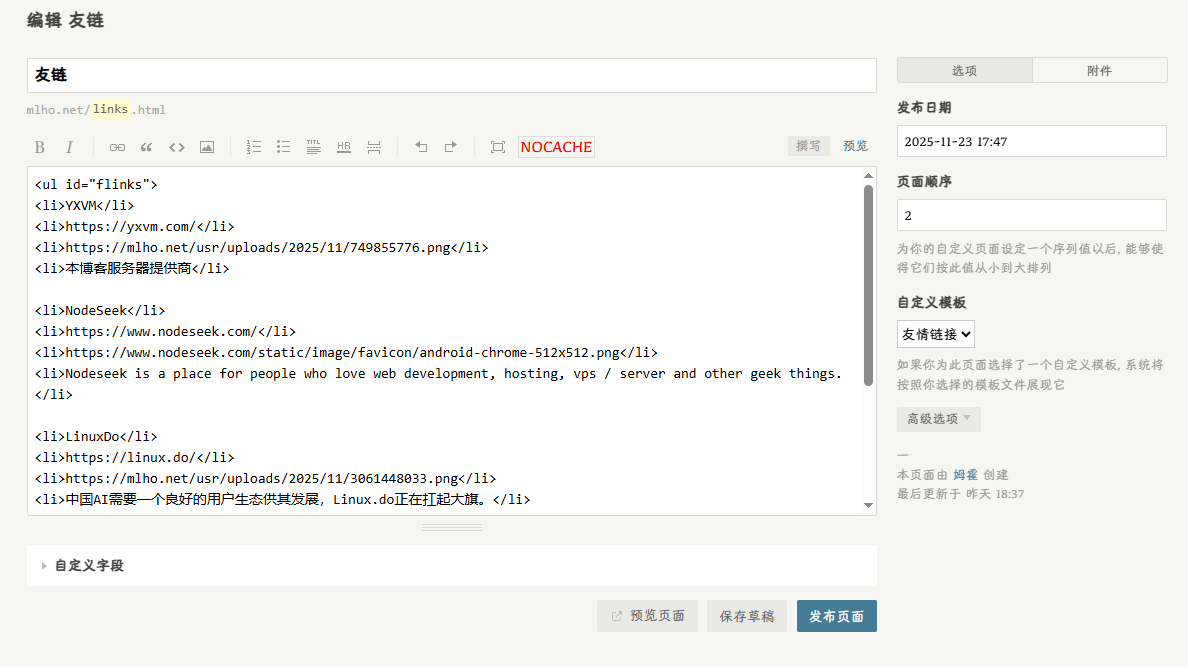
<ul id="flinks">
<li>YXVM</li>
<li>https://yxvm.com/</li>
<li>https://mlho.net/usr/uploads/2025/11/749855776.png</li>
<li>本博客服务器提供商</li>

<li>NodeSeek</li>
<li>https://www.nodeseek.com/</li>
<li>https://www.nodeseek.com/static/image/favicon/android-chrome-512x512.png</li>
<li>Nodeseek is a place for people who love web development, hosting, vps / server and other geek things.</li>

<li>LinuxDo</li>
<li>https://linux.do/</li>
<li>https://mlho.net/usr/uploads/2025/11/3061448033.png</li>
<li>中国AI需要一个良好的用户生态供其发展,Linux.do正在扛起大旗。</li>
</ul>

## 友链申请

如需添加友链,请在评论区留言:
- 网站名称
- 网站地址
- 网站图标
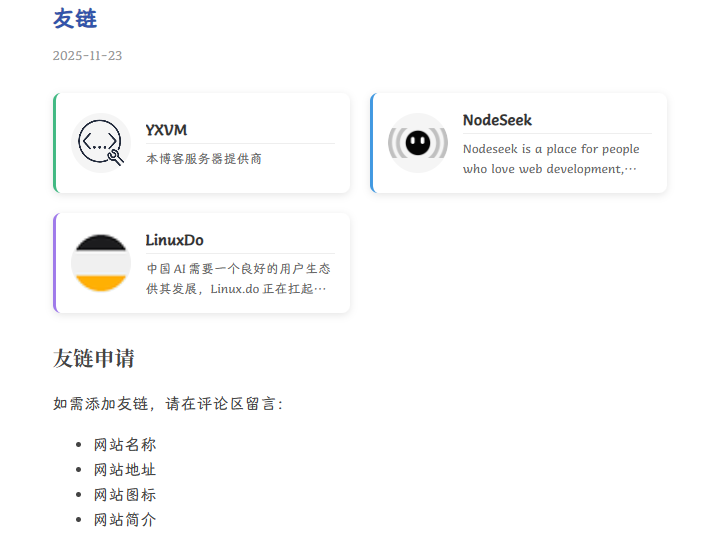
- 网站简介- 点击保存并发布。访问该页面,即可看到美观的友链列表效果。
效果演示